TL;DR
- Ghostty Configurator is a native macOS settings app for the Ghostty terminal. It reads your actual config file, presents every option as a friendly control with plain-language explanations, and writes your changes back. You never touch the file.
- Built with AI in SwiftUI, and designed to pass a squint test against macOS System Settings.
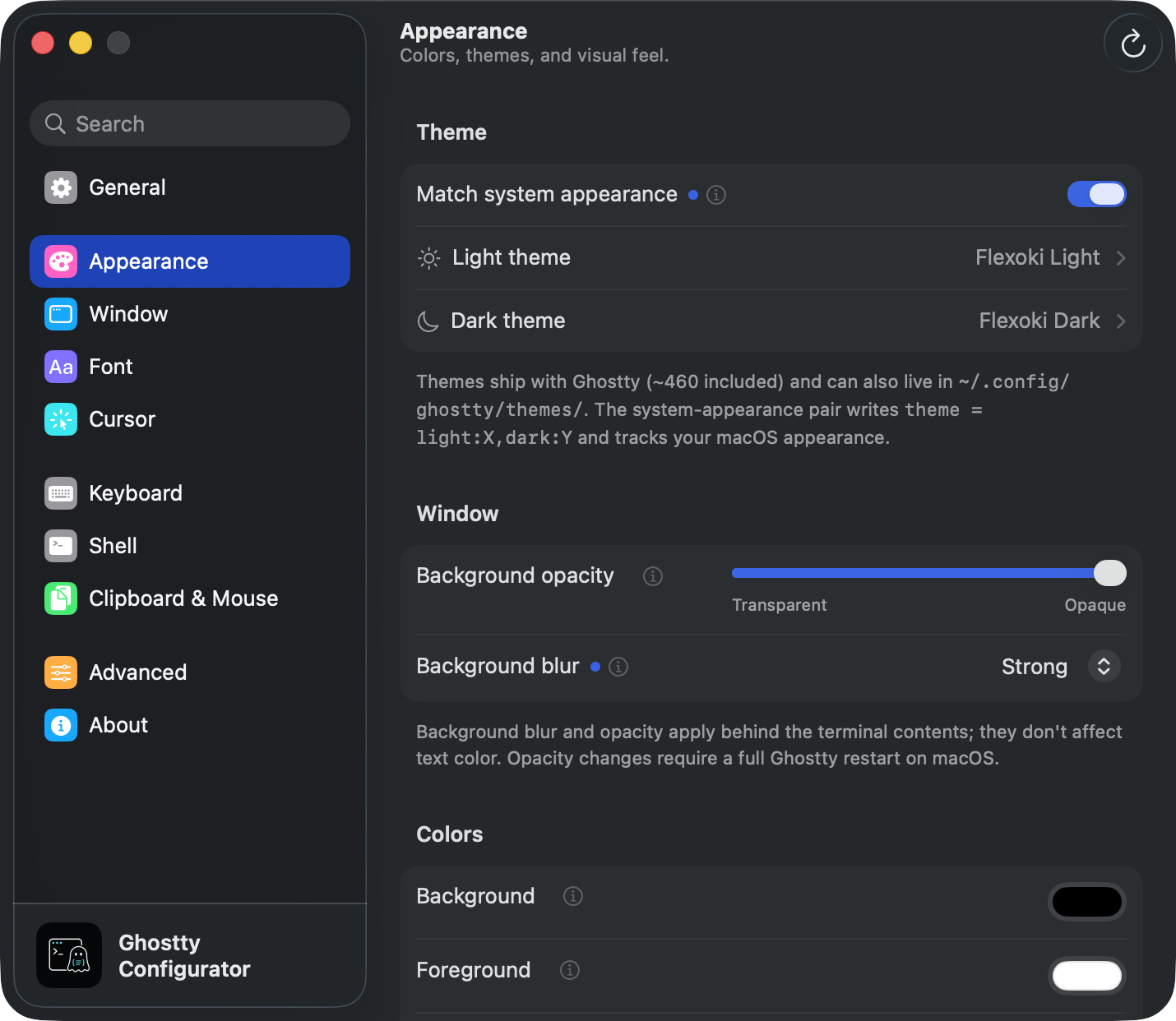
The Spark
Press cmd + , in most Mac apps and you get a settings window. Press it in Ghostty and it opens a plain text file in your editor.
That’s not an accident, and it’s not neglect. Ghostty’s own docs say the quiet part out loud: the project is built around sensible defaults and a zero-configuration philosophy, and right now the text file is the only way to configure Ghostty. The docs also promise that “in the future, we plan to also support native GUIs for configuration in line with our native UI philosophy.” Mitchell Hashimoto has said the same in interviews: GUI-based configuration is one of the features “missing in the initial 1.0 release but that we know are important.”
So the team made a deliberate call. Ship the best terminal core first, defer the settings UI. Completely fair. But it leaves a real gap today, and I live in that gap every time I want to tweak a setting.
The Problem
Here’s what configuring Ghostty actually looks like:
cmd + ,opens the config file.- You open the reference docs in a browser.
- You hunt for the right key, learn its exact syntax, and type it in by hand.
- Save, reload, and hope.
Step 4 is the killer. Mistype font-familiy and nothing happens in the moment. Your setting just doesn’t apply, and on the next launch you get an error window exactly this unhelpful:
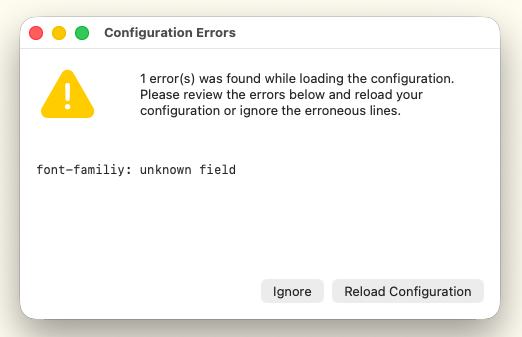
So you troubleshoot backwards, docs in one hand, config in the other, to find out what you got wrong.
The Core Friction
The config file gives you no feedback as you type. The only way to know a setting works is to save, relaunch, see if something breaks, then test the specific scenario, notice it failing, and go read more.
And the nuances stack up:
- Discovery is half the problem. 188 options, around 80 keybind actions, ~460 bundled themes. You can’t configure what you don’t know exists.
- Some values have their own grammar.
theme = light:X,dark:Y. Keybind chords and sequences. Ligature toggles likefont-feature = -calt. Each one is a small language you have to learn before you can use it. - Config can span multiple files. Ghostty supports includes, plus two valid config locations with a merge order. “Which file did this value actually come from” is a genuine question with a non-obvious answer.
- Theme picking is blind. You set
theme = something, reload, look at it, and repeat. Nobody does that 460 times.
What already existed
I wasn’t the first person to notice this. ghostty.zerebos.com is a web-based configurator, and it’s a genuinely nice piece of work. I tried it before building anything.
Two gaps kept it from solving my problem:
- It still assumes you speak the config. Plenty of fields expect you to understand the option deeply and type raw values yourself. It speeds up an expert; it doesn’t carry a nominal terminal user.
- The last mile stays manual. It generates config text that you then copy into your own file by hand. The risky step, the one with no validation and silent failures, is exactly the step it leaves with you.
It’s a faster keyboard for people who already know the language. I wanted something closer to a translator.
The Solution
A native macOS app that:
- Presents every setting in System-Settings-style panes, grouped the way you’d expect (Appearance, Window, Font, Keyboard, and so on).
- Explains each field and each possible value with friendly labels. No raw flags or grammar anywhere in the UI. The verbatim Ghostty docs are one click away when you want them.
- Loads, modifies, and writes the config file directly. No generated text, no copy-paste step. You toggle a control, the file updates, Ghostty reloads.
Why native SwiftUI instead of another web app? Partly a personal choice: I wanted to try building a native macOS app with AI. But it also unlocked the actual design bet. I wanted a settings app indistinguishable from System Settings in look and feel, and on macOS Sonoma the System Settings look is the SwiftUI default rendering. The move isn’t to out-design Apple. It’s restraint. Every fight you pick with the framework takes you further from native, not closer.
I call it the squint test: put the app next to System Settings and you shouldn’t be able to tell which is which. Not just visually, but behaviourally. Auto-save with undo, the little blue “modified from default” dot, inline docs behind an info button.
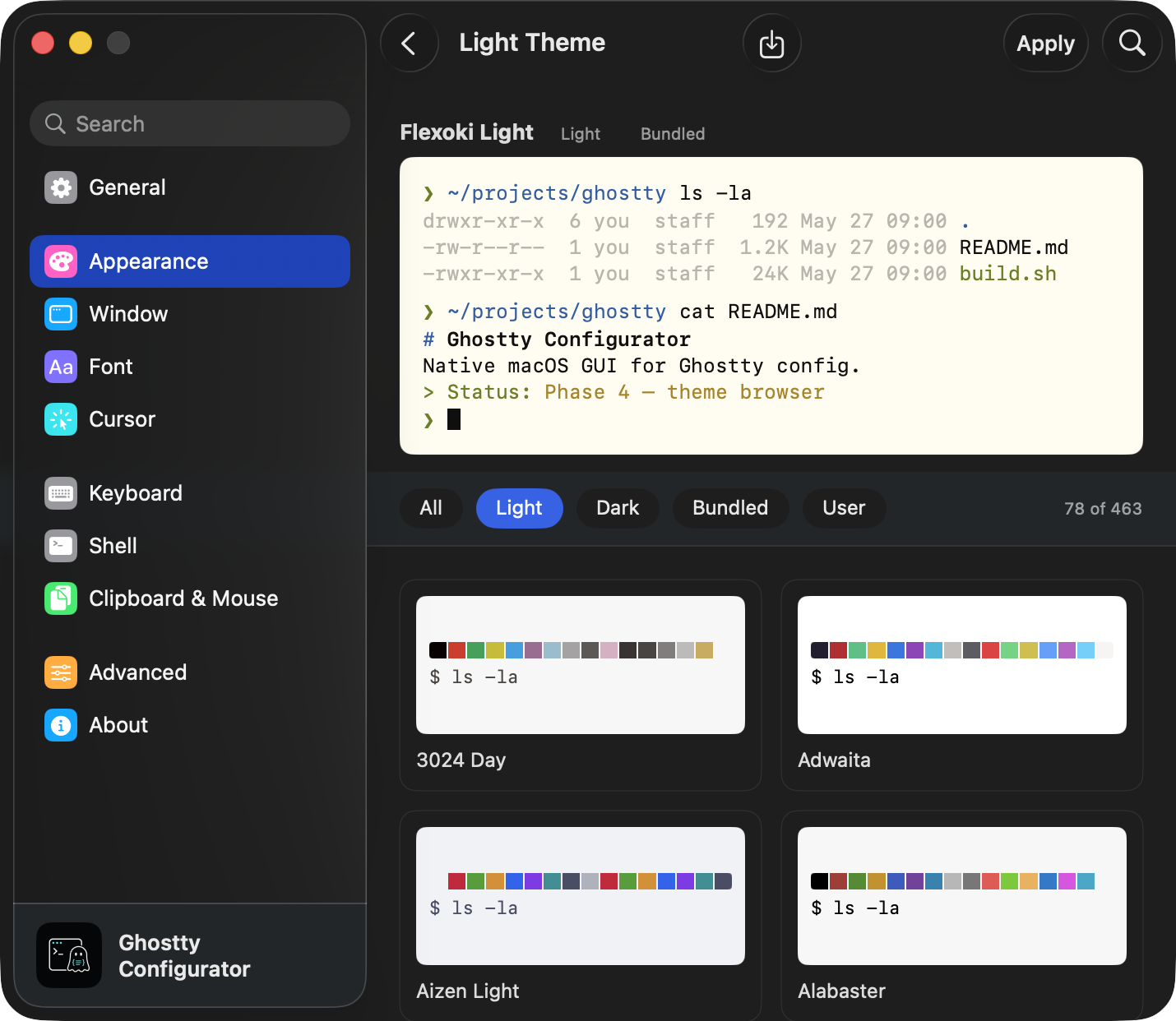
The theme browser is the rich experience theme settings were always owed. All ~460 bundled themes, filterable by light/dark, each rendered as a live faux-terminal preview. The blind theme = ? loop becomes browse, compare, apply.
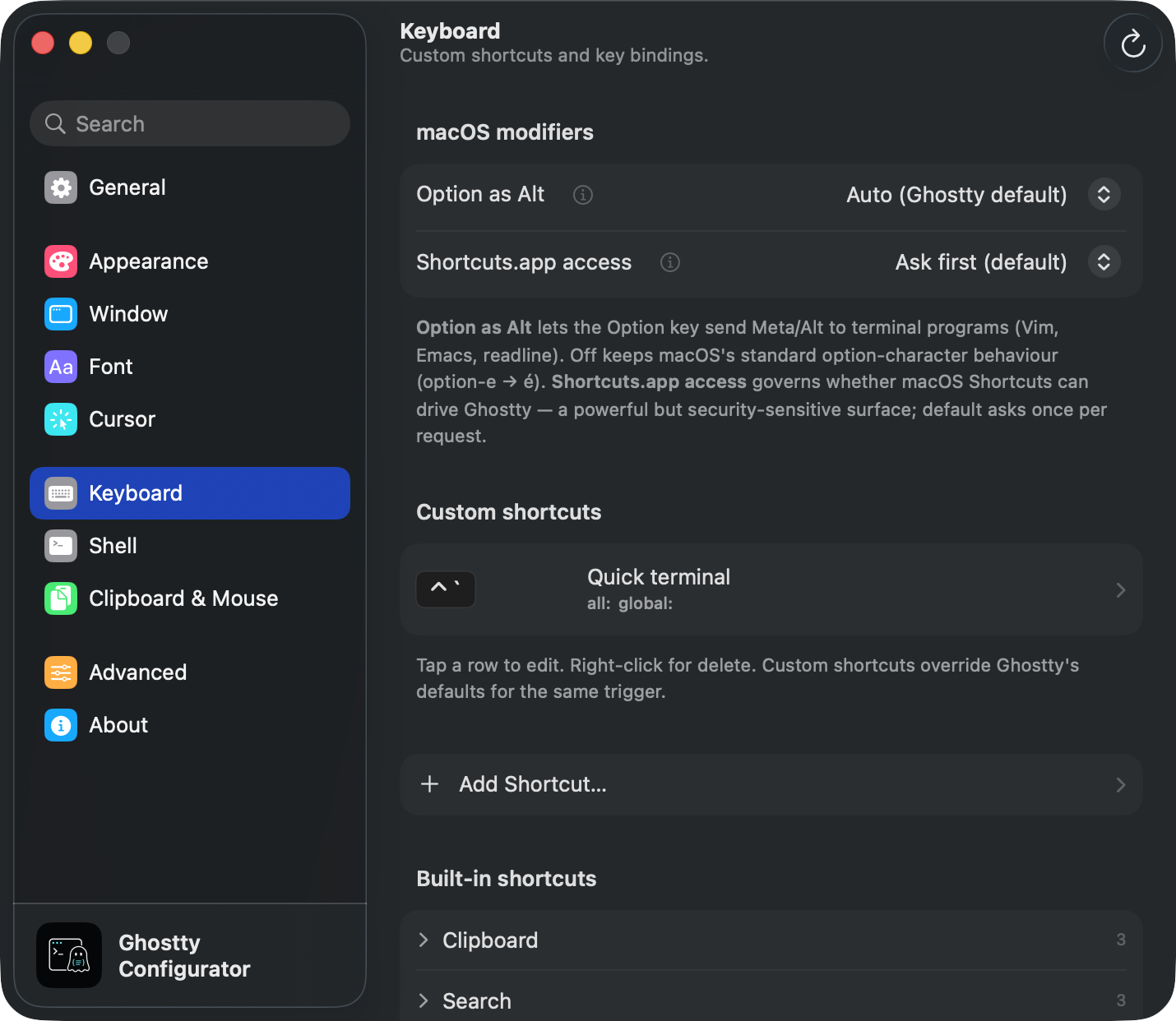
The keybind editor collapses Ghostty’s chord and sequence grammar into macOS modifier glyphs and a browsable list of every built-in shortcut. You record a hotkey instead of writing one.
What makes it different
A few decisions I think give it a real edge over “a form that edits a file”:
- Validation lint. Unknown keys and bad values get flagged as you type, not as a cryptic error window on your next launch.
- Lossless round-trip. A custom parser preserves your comments, blank lines, ordering, and multi-file includes. The app is a companion to the text file, never its replacement. It edits around you; it never rewrites your file.
- Settings provenance. Every row can show you which config file (and line) a value actually came from, given the merge order. The “where did this come from” question gets a real answer.
- Schema introspected at runtime. Options are read from your installed
ghosttybinary rather than hard-coded, so the app survives Ghostty’s minor-version churn instead of going stale. - SettingsKit. The System-Settings-parity design system got big enough that I extracted it into SettingsKit, so anyone can add a settings view indistinguishable from System Settings to their own app.
Built with AI
I’m a product manager, not a Swift engineer. This entire app (~11.5k lines of SwiftUI) was built with AI across a handful of focused sprints. The interesting part was never the Swift. It was learning to architect software alongside an AI: front-loading research and design docs so the model had real taste to work against, encoding principles as constraints (the squint test, lossless round-trip, never expose raw syntax), and reviewing at the level of decisions and trade-offs rather than line by line.
Still in the works
Quite a few areas are still under construction. I deliberately covered the sections that 80% of users actually touch first (appearance, fonts, keybinds, windows), and I’m working through the rest. If you’re an open source contributor, I’d genuinely encourage you to poke at it, find issues, and raise them so I can fix them.
Ghostty is © Mitchell Hashimoto. This configurator is an independent third-party companion, not affiliated.